

Autodesk Fusion and Inventor Professional are both 3D mechanical CAD applications from Autodesk. Let’s find out which one best fits your needs.
Overview
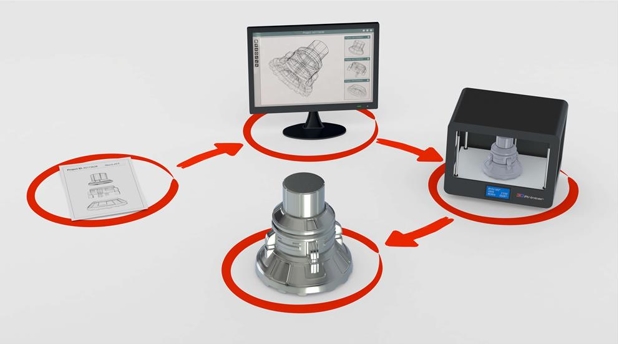
Computer-aided design (CAD) refers to creating technical drawings on a computer, and today it is one of the most important elements in designing and developing products. CAD covers both 2D drawings and 3D models and is used across many industries, including architecture, construction and mechanical engineering. In mechanical engineering alone there are many different software options; among them, Fusion and Inventor Professional both come from Autodesk (the company behind the well-known AutoCAD). In this article, we look at the differences between these two 3D mechanical CAD applications.
Autodesk Inventor Professional
Autodesk Inventor has been on the market for nearly 20 years since its first release in 1999. Built by Autodesk as a professional-grade mechanical design solution, Inventor offers extremely powerful 3D modeling tools, supporting everything from the first sketches to simulations and stress analysis. Inventor is widely used by professional companies around the world for engineering and mechanical design and is known as reliable, consistent software. Notably, Autodesk Inventor can work with 3D files from other applications and also offers freeform modeling and parameter management.
Autodesk Fusion
Autodesk Fusion is much younger than Inventor: it is a newer, feature-rich Autodesk product first released in 2013. Built on a cloud platform, Autodesk Fusion runs on and stores its data in the cloud. Functionally, Autodesk Fusion is similar to Inventor, also supporting parametric, freeform and direct modeling. However, Autodesk Fusion has a somewhat different user interface that is relatively modern and easier to get started with than Inventor.
System requirements
First of all, if you use macOS, Autodesk Fusion is the best choice for you, because Inventor Professional does not support that operating system. Inventor runs only on Windows, while Autodesk Fusion supports both Windows and macOS. Fusion also makes it easy to switch between computers because your data is already in the cloud: you simply sign in to your Autodesk account to access it. (Inventor runs on a Mac only if you also install Windows on that machine.)
In terms of memory, Inventor recommends around 20 GB of RAM, with a minimum of 8 GB. Autodesk Fusion is lighter, with a recommendation starting from just 4 GB of RAM. This is partly because Inventor’s target customers are companies working on projects with hundreds or thousands of parts (for example, a vehicle or a machine system), which means they need very powerful workstations.
System requirements from Autodesk:
- Autodesk Inventor: https://www.autodesk.com/support/technical/article/caas/sfdcarticles/sfdcarticles/System-requirements-for-Autodesk-Inventor-2026.html
- Autodesk Fusion: https://www.autodesk.com/support/technical/article/caas/sfdcarticles/sfdcarticles/System-requirements-for-Autodesk-Fusion-360.html
Investment cost
Both Inventor and Fusion are distributed by Autodesk as subscriptions, with annual plans. Autodesk also offers a free 30-day trial for both Fusion and Inventor.
Fusion offers a premium package, Fusion Ultimate, which unlocks a number of attractive features for simulation, manufacturing and advanced design. Inventor also has a full edition, Inventor Professional, which gains several advanced modules (HSM, Nesting and Nastran In-CAD) in the Product Design & Manufacturing Collection.
The investment cost of Fusion Ultimate is lower than that of Inventor Professional.
Storage and sharing
Fusion is built on a cloud platform and connected directly to your Autodesk account; all files, models and projects are stored online. This lets you share models with other people, much like a cloud drive. It also means Fusion lets you work on different devices, such as your home desktop or your personal laptop while on the move, with consistent data (an Internet connection is needed to sync).
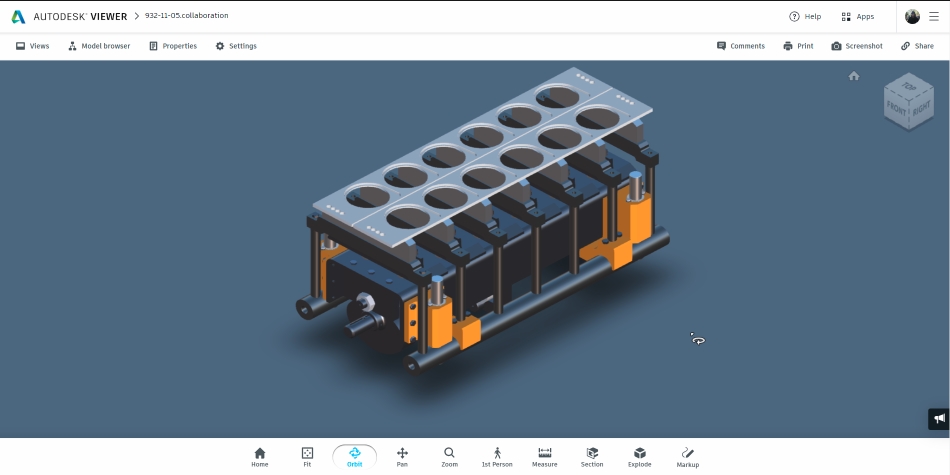
Inventor still offers some options for exporting and sharing projects online, but the system essentially works offline. Files are stored on your hard drive, and Inventor’s advantage is that you do not depend on an Internet connection. Since Inventor Professional 2019, you can also share project components to the cloud (Shared Views collaboration), allowing engineers and clients to communicate through markups directly on the model, without needing Inventor installed to view these shared models.
In fact, Fusion can still download project files to your computer and work offline, but some features will be limited, so it is best to have a stable Internet connection when using the software.
Ease of use
Fusion was released later and is aimed at users who are new to 3D CAD, so its interface is lighter and easier to learn. Inventor targets professional users, so its interface is geared toward managing many parts and complex models more effectively.
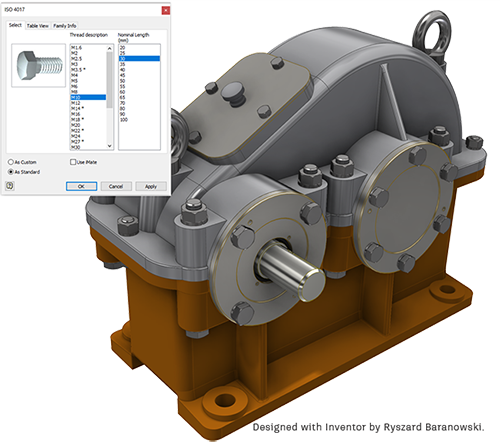
- Scalability for growing projects: Inventor organizes all dimensions and parts in a clean, logical list, making it easy to manage and change your project even when it contains hundreds of parts. Fusion, by contrast, is geared toward simpler models; large models can become a real headache for Fusion users, and sometimes a simple change can cause chaos.
- Manufacturing-focused features. Inventor’s components are designed for the industrial world, while Fusion is aimed more at individual and hobbyist users. For example, Fusion’s library of engineering parts includes only a handful of standard parts to choose from. That keeps things simple for beginners but falls short for professional users who need more advanced customization, which Inventor provides.
- Simulation. Both applications provide an environment for testing models for stress, loads and so on, but Inventor has more detailed tools for a wider range of analyses.
- Workflow. For users already familiar with 3D CAD software, Inventor delivers a faster working pace. Fusion is more approachable and easier for newcomers to learn.
Conclusion: is Autodesk Fusion meant to replace Inventor in the future?
Fusion and Inventor are siblings in many respects, so their modeling logic is nearly the same; they differ only in depth and in how models are managed. Most models built in Fusion can be built in Inventor and vice versa, but the two applications are clearly designed for two different groups of customers.
Autodesk Fusion works well for general users and those who value simplicity and a lightweight tool. It still delivers the full functionality of professional 3D mechanical CAD software at a lower cost and with a gentler learning curve. It is especially suited to people who work on the move and need their data in sync.
Autodesk Inventor is the best choice for professionals and serious engineers. It offers features refined over many years of experience, is familiar to the manufacturing world, and comes with an extensive library of standard parts and powerful customization tools. Inventor especially stands out when handling complex drawings with many parts.
Fusion and Inventor also work very well together: you can easily move projects between the two applications to suit your work at different stages. That is why some designers want to master both applications and make the most of each one’s strengths. To meet this need, Autodesk offers the Autodesk Product Design & Manufacturing Collection, which includes Inventor Professional, Autodesk Fusion, AutoCAD, 3ds Max and more.
In conclusion, Autodesk Fusion was not created to replace Inventor, but to serve users who prefer simplicity and do not need Inventor’s most advanced features. Another simple way to picture it: users who need a full feature set install a desktop office suite on their computer, while users who only handle simple documents can use a browser-based version with no installation. The two are developed in parallel and complement each other rather than replacing one another.