


3Ds Max® is 3D rendering and rendering software that helps you create stunningly large worlds in games, stunning views to visualize designs, and support for compelling virtual reality technology.
CONTACT US
or call 0919-019-964
Autodesk 3ds Max
Professional 3D Modeling,
Animation, and Rendering Software
Autodesk 3ds Max is professional software for creating and visualizing three-dimensional objects. It provides a comprehensive set of tools for 3D modeling, rendering, animation, and visual effects. 3ds Max is widely used in industries such as architecture, interior design, visual effects (VFX), film production, and game development.
>> Autodesk 3ds Max is included in the Autodesk Architecture, Engineering & Construction Collection, together with Revit, AutoCAD, and other solutions for the architecture, engineering, and construction industry.
>> Autodesk 3ds Max is included in the Autodesk Product Design & Manufacturing Collection, together with Inventor Professional, AutoCAD, and other solutions for product design and manufacturing.
🔥 DO NOT MAKE A DECISION before receiving a quotation and solution consultation from OneCAD VN!
Purchase an Autodesk 3ds Max License
Call now: 0919-019-964
to receive a competitive quotation from OneCAD VN!

Elevate Your 3D Design and Visualization Experience
Modeling & Texturing
Access more than 100 modifier tools for parametric modeling and the precise creation of complex details.

Arnold Rendering
Produce cinematic-quality images and animations directly within the software using the integrated Arnold renderer.
OpenUSD & OpenColorIO
Support open USD formats and simplify interoperability across modern VFX and production pipelines.
MAXScript/Python Automation
Use MAXScript, the Python API, and the .NET SDK to automate repetitive tasks and customize production workflows.
Smart Extrude & Retopology Tools
Accelerate the modeling process and efficiently optimize complex meshes.

Real-Time Viewport & Rendering
Preview lighting, shadows, and PBR materials in real time. 3ds Max also supports industry-leading renderers such as Chaos V-Ray and Corona Renderer.
Key Features of Autodesk 3ds Max
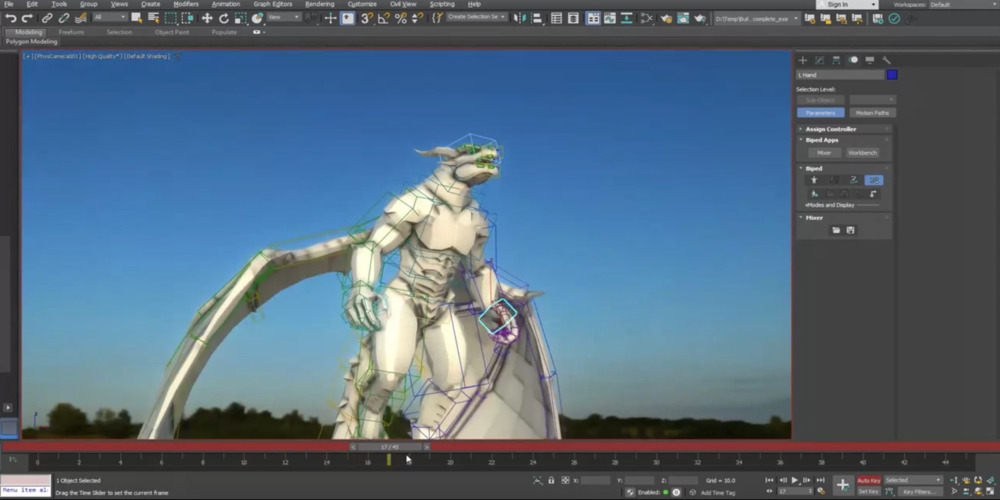
Character Animation Tools
Create and control professional character animations using the integrated CAT, Biped, and Crowd toolsets available in 3ds Max.
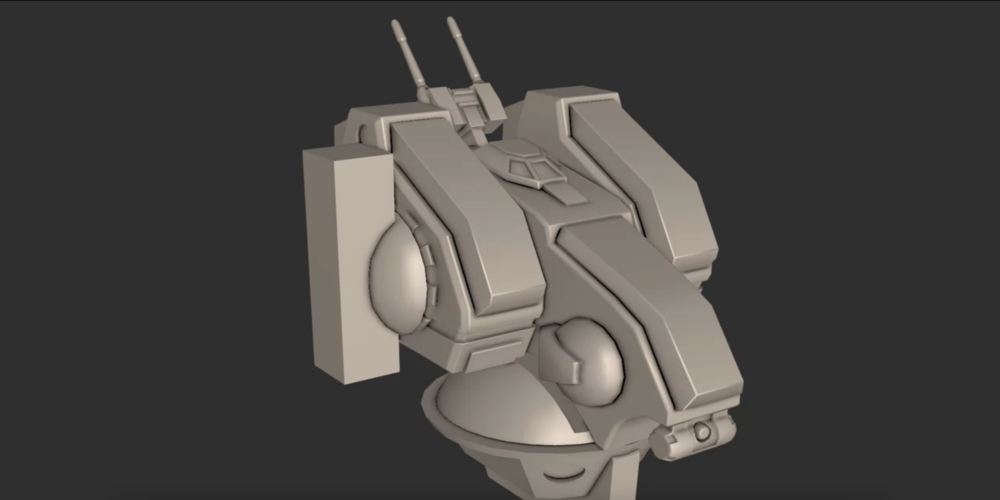
Smart Extrude
Create intelligent extrusion operations that cut through geometry, overlap surfaces, and automatically stitch adjacent faces for a faster and more seamless modeling workflow.
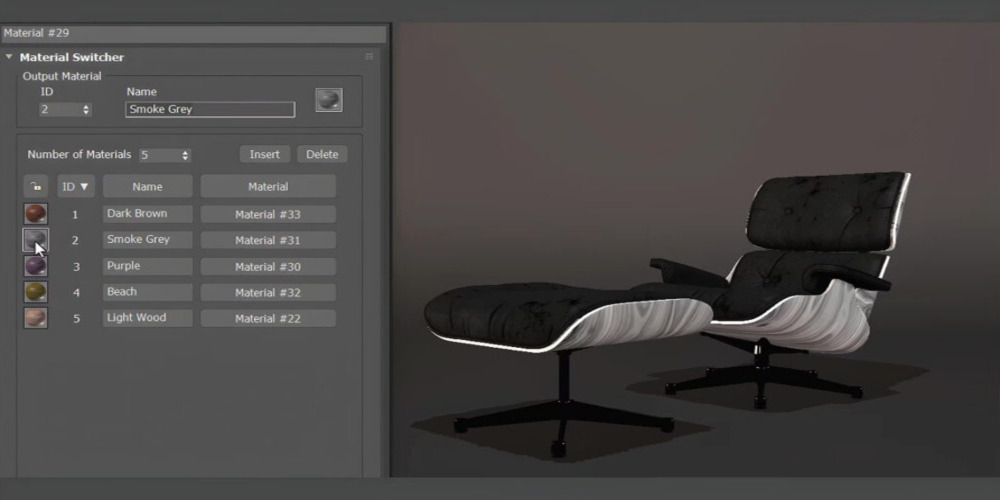
Material Switcher
Easily manage and switch between multiple material variations using a simple and intuitive control system.

Retopology Tools
Automatically rebuild model meshes into clean quad-based topology to optimize surfaces and improve accuracy for modeling, texturing, and animation workflows.
Enjoy the Best Offers from OneCAD VN
A Strategic Autodesk Partner in Vietnam
Frequently Asked Questions
What is Autodesk 3ds Max used for?
Autodesk 3ds Max is used to create 3D models, animations, characters, photorealistic visualizations, and complex environments for film, television, video games, architecture, and design visualization projects.
Who uses Autodesk 3ds Max?
Autodesk 3ds Max is used by 3D artists, modelers, animators, architects, interior designers, visual effects professionals, game developers, and film and television production teams.
What are the minimum system requirements for Autodesk 3ds Max 2026?
- Operating system: 64-bit Microsoft® Windows® 11
- Processor: 2.5 GHz or faster, with four or more cores
- Memory: 16 GB RAM
- Storage: 40 GB of available SSD space
- Graphics card: 2 GB GPU with 29 GB/s bandwidth and DirectX 11 support
Which versions of Autodesk 3ds Max can users install?
Autodesk allows eligible users to install and use the current version, Autodesk 3ds Max 2026, as well as the three previous versions: 2023, 2024, and 2025. The available installation files are listed in the user’s Autodesk Account.
On how many computers can Autodesk 3ds Max be installed?
Autodesk currently provides named-user subscriptions. Each authorized user may install Autodesk 3ds Max on up to three computers. However, the software may only be used on one computer at a time.