

AUTODESK® INVENTOR PROFESSIONAL.
Professional 3D Mechanical CAD Design Software
Autodesk is one of the leading companies in supporting software training and application research in the market today.
Autodesk is making every effort to support its global user community.
Let’s explore the advantages of software training and application in
Autodesk Inventor Professional
The Best Mechanical Design Software for Research and Learning

Autodesk Inventor Professional is considered one of the best software for research and learning in mechanical design fields.
Inventor offers nearly unique advantages:
1
Free Education License (renewed annually)
Autodesk is one of the few major software companies that allow users to register for free access to its software for research and learning. The Education version retains all the essential features of the commercial version.
2
Provides a full set of tools to support machine component design projects (gearboxes)
Especially for mechanical engineering students, the Design Accelerators toolset provides comprehensive support for designing machine component projects, including the calculation and design of gears, worm drives, housings, springs, and more.
3
It is one of the professional parametric 3D design software
Inventor is fundamentally one of the most renowned software for parametric 3D design, offering a full range of features found in professional mechanical design software. It provides comprehensive support for part design, assembly, drawings, and simulations…
Ready for expansion with integrated tools
Beyond just design, Autodesk Inventor is being integrated with additional tools to better serve professional needs in mechanical engineering, such as manufacturing and simulation. It is ready for further expansion in mechanical research.
(The additional tools in the PD&M Collection are also available in the Education version)
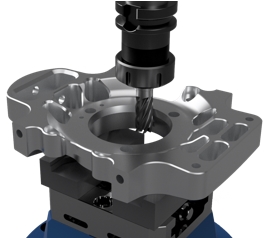
Inventor CAM
Inis an add-on software for Inventor, designed to support CNC machining with a user-friendly interface, working directly within Inventor’s CAD environment. It supports 2.5-axis to 5-axis machining.

Inventor Nastran
is a professional simulation tool based on finite element analysis (FEA), integrated directly into Inventor’s CAD environment. It helps users solve problems ranging from simple to complex.
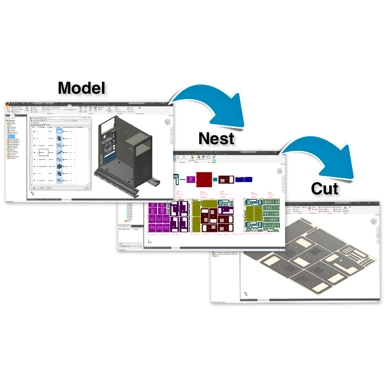
Inventor Nesting
The True-Shape Nesting tool supports sheet layout and design, optimizing material utilization before machining. It is compatible with Inventor CAM for CNC machining, allowing for report generation and comparison.
How to Start Learning Inventor?
The opportunity to learn Inventor Professional in a structured and professional manner is now more accessible than ever. OneCAD Vietnam has become an Autodesk Authorized Training Center for mechanical design software training in Vietnam. The center offers a curriculum based on official Autodesk materials, ensuring a systematic and well-structured learning experience.
Solutions for Learning and Researching Inventor Professional:
Learn at an Authorized Training Center
If you want to save time and follow a clear learning path, you can enroll in training courses at an Authorized Training Center. Currently, these courses are available at discounted rates with various incentives.
Self-study through Autodesk’s materials
Especially for mechanical engineering students, the Design Accelerators toolset provides comprehensive support for designing machine component projects, including the calculation and design of gears, worm drives, housings, springs, and more.
Learn through the community and YouTube
Currently, on social media platforms such as Facebook and YouTube, there are many Inventor user communities. You can join these communities to enhance your skills and learn techniques for using the software effectively.