

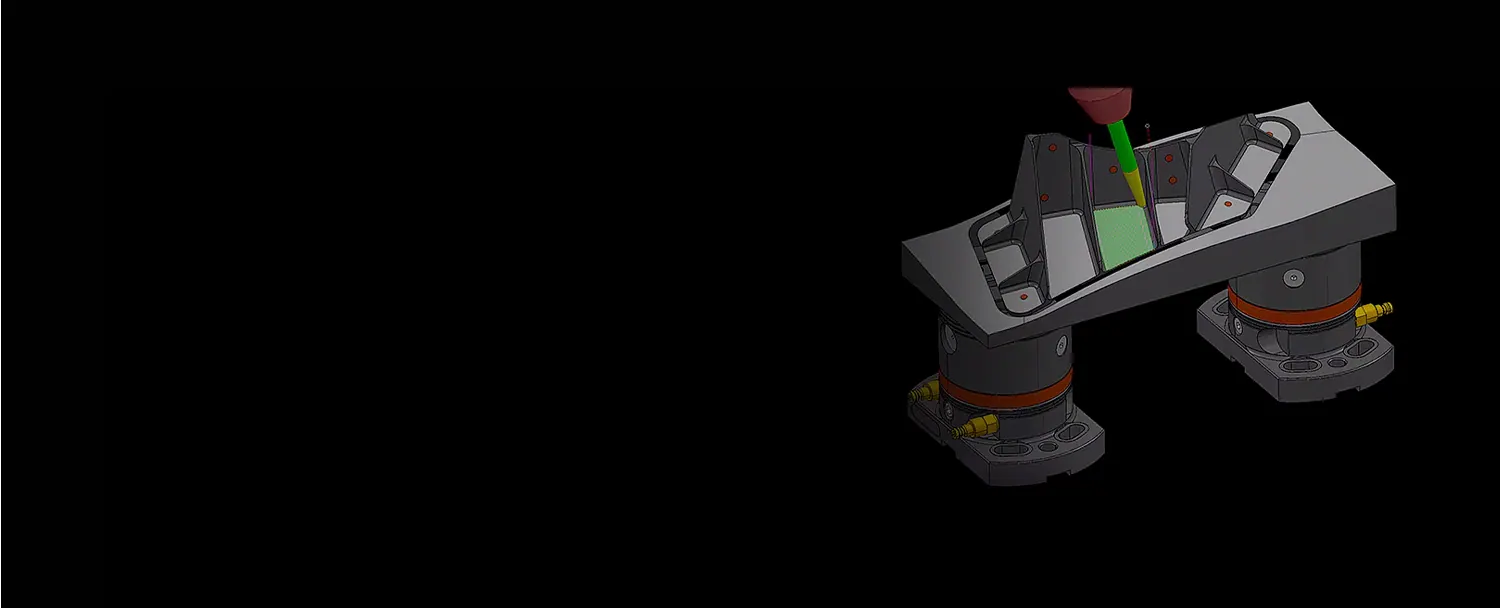

The market-leading high-end 5-axis CAM machining software
TALK TO AN EXPERT
or call0919-019-964
PowerMill
overview
Autodesk Fusion with PowerMill® CAM is a toolpath programming tool for CNC machines that makes production on 3- and 5-axis machines simpler. You can access Fusion and use advanced machining capabilities through Fusion Extensions.
- Supports a wide range of modern toolpath strategies.
- Easy 5-axis CNC programming with Automated Collision Avoidance.
- Applications in solutions such as industrial robots, hybrid manufacturing and more.


Key features
Advanced CNC programming to create complex parts with high precision
PowerMill® 5-axis CAM software provides expert CNC programming solutions for 3- and 5-axis hybrid manufacturing, high-speed machining and production.
Solve complex machining problems with specialized CNC solutions
Provides a diverse library of strategies. Reduce programming time with fast toolpath calculation:
- Shorten machining time with highly efficient 3- and 5-axis NC code.
- Improve control with advanced toolpath editing tools.
- Automate programming with customizable templates and macros.
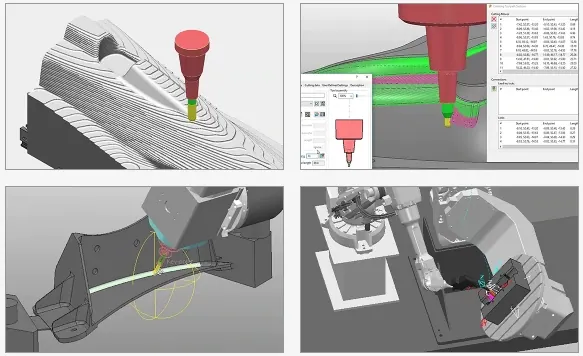
Maximize CNC machine efficiency and part quality
- Automatically avoid collisions and gouges.
- Simulate, verify and optimize the motion of CNC machines and industrial robots.
- Improve productivity on orders with tight deadlines.
- Minimize manual polishing.
Enjoy the best deals at
OneCAD Vietnam, Autodesk’s strategic partner in Vietnam.
See how PowerMill works with
other Autodesk software
Take PowerMill programming further with comprehensive CAD/CAE
Optimize mold design and improve manufacturing
Use specialized modeling tools optimized for CAM programming
Take PowerMill programming further with comprehensive CAD/CAE

 PowerMill + Fusion
Fusion provides 3D modeling, generative design, simulation, electronics, collaboration and much more.
 PowerMill + Moldflow
Engineers and analysts use Moldflow plastic injection molding simulation software to improve plastic part design, injection mold design and the manufacturing process.
 PowerMill + PowerShape
Get models ready for manufacturing tools to help prepare complex parts for machining. Find and repair errors in imported data. Add geometry to optimize CAM programming.
Looking for a professional machining solution?
OneCAD Vietnam confidently provides precise 2.5- to 5-axis CNC machining solutions to meet every customer need.
Consulting and support
With experience applying software to real machining processes, OneCAD Vietnam’s machining engineers are ready to advise and help customers solve their problems in the best way.
Training & Implementation
As the only authorized training center in Vietnam for mechanical engineering, OneCAD Vietnam offers professional training packages and implementation of CAM software in your business.
Optimization & Verification
OneCAD Vietnam provides outsourcing services to optimize post-processors or to advise on verifying quality issues of parts machined with CAM software.
Comparing PowerMill Standard and
PowerMill Ultimate
CAD Import
CAM programming
Collaboration
Collision checking and simulation
Specialized solutions
CAD Import
 STANDARD | ULTIMATE | |
|---|---|---|
| Neutral CAD data Reads neutral CAD formats such as IGES and STEP | ✓ | ✓ |
| Native CAD data Opens data from other software such as Siemens NX and CATIA. | ✓ | ✓ |
| PowerMill Modelling Use PowerMill Modelling to repair geometry and fill surfaces to support CAM | ✓ |
STANDARD | ULTIMATE | |
|---|---|---|
| 2.5D machining Machine geometry such as holes, pockets, slots and other 2D shapes. | ✓ | ✓ |
| Mill-turn turning programming Create turning toolpaths for milling machines with turning capability. | ✓ | ✓ |
| 3-axis roughing Create high-efficiency roughing toolpaths and rest machining efficiently. | ✓ | ✓ |
| 3-axis finishing Use 3-axis finishing strategies (except Rib machining). | ✓ | ✓ |
| 3-axis toolpath editing Edit toolpaths globally and locally to optimize machining. | ✓ | ✓ |
| 3+2-axis milling Use the machine’s rotary axes to position the part in an orientation that is easy to reach with 3-axis machining. | ✓ | ✓ |
| 4-axis machining Create 4-axis toolpaths easily. | ✓ | ✓ |
| Simultaneous 5-axis machining 5-axis programming that makes full use of the machine axes for complex parts. | ✓ | |
| 5-axis toolpath editing Optimize machine and tool-axis motion globally and locally along the toolpath. | ✓ | |
| 5-axis automatic collision avoidance Avoid collisions automatically by making full use of the machine axes. | ✓ | |
| Robot milling programming Program machining for industrial robot arms as efficiently as possible. | ✓ | |
| Surface inspection (subscription only) Create on-machine surface inspection routines on CNC machines and view results with Autodesk Drive. | ✓ | |
| 3D printing support (subscription only) Create, control and simulate metal 3D printing strategies. | ✓ |
STANDARD | ULTIMATE | |
|---|---|---|
| Custom macros and templates Apply optimized processes to production with company-specific macros and machining commands. | ✓ | ✓ |
| Setup sheets Share machining information between production stages. | ✓ | ✓ |
| Shared views (subscription only) Share preview data with managers and collaborating departments. | ✓ | ✓ |
| Autodesk Drive (subscription only) Share machining information between production stages. | ✓ | ✓ |
| Fusion Production (subscription only) Share machining data to Fusion to synchronize, track and collaborate. | ✓ | ✓ |
| Posts in the cloud (subscription only) Store your post-processor library online so you can use it from anywhere. | ✓ | ✓ |
| Tool library Store cutting tool data. | ✓ | ✓ |
STANDARD | ULTIMATE | |
|---|---|---|
| Toolpath simulation Simulate tool motion for better control before running on the CNC machine. | ✓ | ✓ |
| Machine model simulation Simulate toolpaths with a 3D CNC machine model. | ✓ | ✓ |
| Cutting tool collision checking Identify gouges, collisions and near-misses between the cutting tool and the stock and fixtures. | ✓ | ✓ |
| Stock simulation Simulate stock removal for better, more efficient control of remaining material. | ✓ | ✓ |
| Surface finish prediction Visualize how machining parameters affect the surface finish of the part. | ✓ | |
| CNC machine collision checking Locate collisions so they can be controlled easily before going to the real machine. | ✓ | |
| Dynamic machine control Adjust the tool axis directly and visually for the safest yet most efficient toolpaths on a 5-axis machine model | ✓ | |
| Simulation analysis Analyze tool motion to avoid issues such as machine vibration and backlash. | ✓ | |
| Project verification Check overall safety before posting the program. | ✓ | |
| Support for simulation software Export tool, part and fixture data as well as G-code for optimized verification with CAMplete, CGTech Vericut and Fidia ViMill. | ✓ |
STANDARD | ULTIMATE | |
|---|---|---|
| Electrode machining Reads TRODE files from PowerShape for automated electrode machining. | ✓ | |
| Rib machining Machine ribs and slots easily with dedicated options. | ✓ | |
| Blade milling Create 5-axis toolpaths for machining aerospace parts | ✓ | |
| Blisk milling Advanced 5-axis machining strategies for the production of blisks and IBRs. | ✓ | |
| Impeller milling Dedicated roughing and finishing strategies for the 5-axis milling of impellers. | ✓ | |
| Port machining Automated machining of port cavities on 3- to 5-axis machines. | ✓ |
Success stories
Duy Tan Plastics – Win of the Day
The leading Company of Plastics in Vietnam deployed comprehensive Solutions of Autodesk for design, simulation, analysis, manufacturing,… With recent pandemic, investment is always considered very carefully but not for technology adoption and workflow management. After…
Consulting & solutions

Frequently asked questions about OpenSpace
OpenSpace FAQ: pricing, compatible 360° cameras, data security, number of users, and integrations with Procore, BIM 360 and Autodesk Construction Cloud.
- Integrated Digital Delivery
- BIM Information Lifecycle Management
- AI-Enhanced 360° Camera Monitoring for Construction Sites
- Applying BIM and CDE in the Construction Phase: Effective BIM Implementation through Autodesk's CDE
Inventor Professional vs Autodesk Fusion: Which One to Choose?
Autodesk Fusion vs Inventor Professional: compare system requirements, cost, cloud storage and ease of use to choose the right 3D mechanical CAD software.
Event: Autodesk AI in Construction – Enhancing Productivity and Unlocking the Value of Project Data
Discover Autodesk AI in construction and learn how AI can support design workflows, unlock project data, and enhance productivity with Revit and Autodesk Forma.
OneCAD Vietnam at the Vietnam Industrial & Manufacturing Fair – VIMF 2026
On June 17, 2026, OneCAD Vietnam participated in the Vietnam Industrial & Manufacturing Fair (VIMF) Binh Duong 2026, held at the World Trade Center…
Autodesk and OneCAD Celebrating AXANH 10-Year Anniversary Event
Vietnamese version On June 16, 2026, Autodesk and OneCAD Vietnam were honored to attend the 10th anniversary celebration of AXANH, a leading Vietnamese engineering…
Views: 12,764