
Comprehensive Data Management Solutions from Autodesk Vault
Picture the design office of a mechanical engineering plant. An old revision is sent to the shop floor, or an assembly does not fit because two engineers used two different versions of the same design file. These errors usually only surface on the production line, when the cost of rework is already high.
Many companies manage CAD data with folder structures, naming conventions and email. That works while data volumes are small, but becomes hard to control as products and teams grow: time is lost finding the latest file, it is hard to know who changed what, and engineering has to keep revision logs in spreadsheets.
This article introduces Autodesk Vault: its main functions, the differences between Vault Basic and Vault Professional, how manufacturers have used it, and how OneCAD supports your deployment.
What is Autodesk Vault?
Autodesk Vault is Autodesk’s product data management (PDM) solution for tracking all digital design data and documents across a company. Data is stored securely and managed centrally, so engineering teams can quickly create, share and secure project information and reduce data loss. Vault is built for design and manufacturing in general and mechanical engineering in particular, and integrates directly with Autodesk software such as Inventor and AutoCAD. See the Autodesk Vault product page.
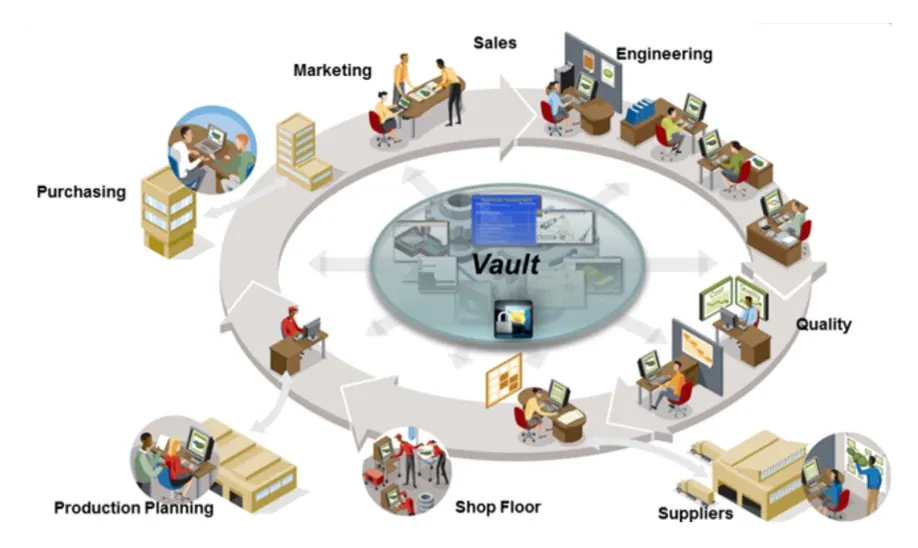
- A single source of data: drawings, 3D models and supporting documents are stored centrally, with access controlled by login.
- Flexible deployment: install on the company’s own server or access over the Internet, depending on security requirements.
- Work from anywhere: with Vault Client, Vault Mobile and Vault Gateway technology, access data securely without a VPN connection.
- Extend to the product lifecycle: combine Vault Professional with Autodesk Fusion Manage (cloud PLM) to manage products and collaborate with partners.
Main functions of Autodesk Vault
Integration with CAD software
Vault works as an add-in for Inventor, AutoCAD and Revit, so you Check in and Check out right inside the design application.
- Simpler data synchronization
- Microsoft Office support: bring Vault data into Word, Excel and PowerPoint
Data and version control
Login-based access, permissions on documents and folders, and revision control. When someone checks out a file, it is locked so others cannot overwrite it.
- Check-in creates a new Version and saves it to the history
- Revisions mark key milestones such as A, B, C
Data reuse
Copy Design lets you start from an existing design to create new parts and products.
- Choose which files to copy or modify
- Where Used shows where a part is being used
Fast search
Search by properties such as material, designer or description; you can also create Shortcuts.
- Unlike searching by file name on a shared drive
- Preview models before opening them
Engineering change orders (ECO) and release
Customize review and drawing release processes through Lifecycles.
- For example: Work in Progress, Review/Approval, Released, Obsolete
- The shop floor only takes Released versions
Web and mobile access
Supports the web and mobile devices (iOS, Android). Vault Thin Client lets you view 2D and 3D data without a license, in view-only mode.
- Share view links with customers
- Annotate and mark up 2D and 3D drawings for quick reviews
Read more: how Vault controls design versions and reduces rework, the advantages of Vault over OneDrive or Google Drive and what Vault Thin Client is.
How do Vault Basic and Vault Professional differ?
Vault Basic provides tools for tracking and updating data, with limited functionality (for example folder permissions, ECO workflows and drawing release). Vault Basic is not sold separately but is included free with the Product Design & Manufacturing Collection, Inventor and AutoCAD Toolsets. Vault Professional is the paid edition with full data and product lifecycle management capabilities. The table below compares their functions.
| Feature | Vault Basic | Vault Professional |
|---|---|---|
| CAD and non-CAD data management | ✔ | ✔ |
| Interface integration | ✔ | ✔ |
| Centralized data | ✔ | ✔ |
| Easy deployment and configuration | ✔ | ✔ |
| Data information retrieval | ✔ | ✔ |
| Automatic versioning | ✔ | ✔ |
| Design reuse | ✔ | ✔ |
| Fast data search | ✔ | ✔ |
| Labels | ✔ | ✔ |
| Shortcuts | ✔ | ✔ |
| Custom view | ✔ | ✔ |
| Rename | ✔ | ✔ |
| Folder security | ✔ | |
| Release management | ✔ | |
| Engineering change process | ✔ | |
| Automatic naming | ✔ | |
| Shared View | ✔ | |
| Share Data | ✔ | |
| Project Sync | ✔ | |
| BOM management | ✔ | |
| Multiple servers | ✔ | |
| ERP integration | ✔ |
The scope of Lifecycle, Revision, BOM, ECO and Item management depends on the Vault edition you deploy; advanced product data management capabilities are concentrated in Vault Professional. Vault Basic comes with the Product Design & Manufacturing Collection.
How do manufacturers use Autodesk Vault?
The three companies below all use Vault with Inventor, and each describes concrete changes in how they work.

NOV Fiber Glass Systems: design and machining data from a single source
Base 3D designs created in Inventor are stored in Autodesk Vault, so production, management and design teams all work from one organized source of data. PowerMill simulates and programs the machining, while Vault for PowerMill notifies the engineering team when there is an update.
- According to Ben Holmes, Design Manager at NOV, work that used to take 3–5 days now takes as little as 20 minutes.
- The company used to waste 30% of engineering time waiting for files to open, save or close; now the data needed opens in seconds.
Kutlusan: no more revision mix-ups
Kutlusan’s R&D team uses the Autodesk PDM Collection with 12 users, plus 8 Vault Professional seats. Before Vault, everyone received their own copy in a poorly organized folder structure, leading to many duplicate designs.
- Identifying the latest revision used to take time; after moving to Vault, these complicated procedures disappeared.
- R&D specialist İbrahim Küçük says the team now has more time for design and R&D.

PHS West: standardizing custom designs
PHS West uses Autodesk Inventor to design specialized medical carts and heavy-duty tugger cart systems for data centers.
- All design data, the Content Center library and iLogic rules are stored and managed centrally in Vault Professional.
- Data stays synchronized and standardized, and updates are easy to roll out to the whole engineering team.
See Vault in action
A video guide to getting started with Vault Basic:
A video on managing design data efficiently with Autodesk Vault:
If you use Inventor, the article 5 reasons to integrate Vault into your Inventor Professional design workflow summarizes benefits such as design history, Copy Design, Where Used, backup and permissions.
How does OneCAD support your Autodesk Vault deployment?
OneCAD has been an Autodesk Gold Partner since 2017 and an Autodesk Authorized Training Center (ATC) since 2016, and was recognized as a Service Provider Select in 2020. For Vault, we advise you from assessment through to operation:
- Design and manufacturing process assessment: naming, revisions, drawing release and where errors are currently occurring.
- Edition and architecture: Vault Basic or Professional, on-premises server or Internet access, integration with Inventor, AutoCAD and ERP.
- Configuration: permissions, Lifecycles, automatic naming and ECO workflows.
- Training and support: training for engineers and administrators, and technical support after deployment.
See also OneCAD’s capabilities and the Autodesk Fusion solution for design and manufacturing.
Frequently asked questions about Autodesk Vault
How is Autodesk Vault different from OneDrive or Google Drive?
Vault works on a Check-in/Check-out principle: on Check-out, the file is downloaded from the Vault Server through Vault Client and locked for the person editing it; Check-in creates a new Version in the history. Vault also integrates deeply with Inventor, Revit and AutoCAD, searches by properties and offers Copy Design. See the detailed comparison.
What is the difference between a Version and a Revision?
A Version is one save in the history of a file and its metadata in Vault. A Revision is a significant milestone of a file or Item, usually labeled A, B, C. One Revision can contain many Versions.
Should I choose Vault Basic or Vault Professional?
Vault Basic suits basic data tracking and updating, and is included free with the Product Design & Manufacturing Collection, Inventor and AutoCAD Toolsets. If you need folder permissions, ECO, release management, BOM, multiple servers or ERP integration, you need Vault Professional. OneCAD will advise based on your specific process.
Do I need a VPN to work remotely with Vault?
Not necessarily. According to the product page, Vault Client and Vault Mobile with Vault Gateway technology allow secure access without a VPN connection.
Does Vault Thin Client require a license?
Vault Thin Client is a free web-based 2D and 3D viewer from Autodesk, available with Vault Professional, and supports viewing data only. Users do not need an additional license to view.
Autodesk Vault deployment consulting
Tell OneCAD how you currently manage design data and where you are getting stuck. Contact OneCAD for an assessment and a recommendation on the right Vault edition.