

Industrial Robot Applications
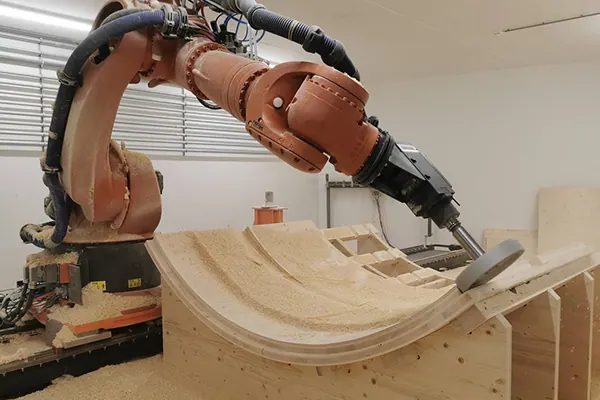
Imagine a workshop that needs to machine a foam mold several meters long, or a large wooden sculpture. A CNC machine doesn’t have the travel, but a robot arm can reach it. The question is who will program the robot, and how you will know it won’t collide or exceed its axis limits before it runs for real.
Industrial robots are becoming increasingly accessible to small and medium-sized businesses. According to our article robots in manufacturing: applications, cost and flexibility, small robots, collaborative robots (cobots) and the used-robot market have brought costs down significantly. The real difficulty is usually programming: “teach and learn” methods are time-consuming, and hand-written programs are hard to verify.
This article explains how PowerMill Robot handles three tasks: programming motion, simulating before running, and checking safety, together with four typical manufacturing applications.
What is PowerMill Robot?
PowerMill Robot is a plugin in PowerMill that lets you use PowerMill to program not only CNC machines but also robots. Autodesk describes it as a powerful, flexible and easy-to-use toolset for programming robots, optimizing motion, and simulating complete manufacturing cells and systems from many popular robot brands.
- With one CAM application for both CNC machines and robots, programmers don’t have to learn a new tool from scratch.
- Generate NC programs for robots instead of lengthy “teach and learn” methods.
- Post directly to robot language, without third-party software.
- Simulate the entire robot cell before running it for real.
It is part of the Autodesk CAM solution. If you are comparing machining software, see also CAM solutions for CNC machining.
Program, simulate and safety-check robot motion
Motion programming
Machine complex parts with the workpiece on the table or held by the robot arm. Generate NC programs with tool retract moves and simulate tool head changes.
Software simulation
Configure the robot to match reality so every setup is consistent, then post directly to robot language.
Workspace checking
Display the robot’s workspace to optimize system placement and see the maximum range of motion each axis needs.
Performance optimization
Position-based graphs help you avoid axis limits, robot singularities and axis flips, and eliminate the risk of overload.
Save cell configurations
Save the correct robot cell configuration, including axis limits, tool constraints and home position, to reuse next time.
You can extend the workspace with external axes such as rails and rotary tables, so the robot achieves higher productivity. Just as with CNC machines, simulation and collision checking in PowerMill help you spot problems before the robot actually moves.
Demo videos
What are PowerMill-programmed robots used for in manufacturing?
Stone and wood carving
Turn a robot into a carving tool, using toolpaths to create large stone and wood pieces with complex shapes.
- Large, complex parts
Foam and plastic machining
For statues or carvings in foam and plastic, PowerMill Robot helps achieve a higher-quality finish and significantly cuts programming time.
- Significantly less programming time
Support for material sintering and printing
Support material sintering and printing applications, with the robot’s workspace checked from the start.
- Detect robot reach issues early
Repair worn or damaged surfaces
Use laser cladding to repair surfaces and improve a part’s performance or wear resistance.
- Improve performance or wear resistance
In practice: programming a robot from 3D scan data
On 18 June 2022, OneCAD, together with AutoSS Robotics and AIE, held the “Robot Programming and Simulation Solutions” workshop at a robotic machining workshop in Ho Chi Minh City. Participants tried programming toolpaths and running them right away on a Motoman ES200 industrial robot, using real 3D scan data, on the theme of machining large statues.
The demo went from a physical object to a 3D model, then programming and robotic machining. The workshop was aimed at people already familiar with CAM programming for CNC machines who wanted to know how robot programming differs. See the details in the Robot Programming and Simulation Solutions workshop.
For a broader view of the technology, read 5 examples of innovation in industrial robotics.
OneCAD alongside you in robot programming
OneCAD is an Autodesk Gold Partner (since 2017), an Autodesk Authorized Training Center (ATC) since 2016, and was recognized as a Service Provider Select in 2020. For machining teams, this means you get both the licenses and people who work alongside your programmers until the programs run reliably on the machine:
- Assessment: understand the workshop’s machines, part types, materials and current programming methods.
- The right product: recommend software that fits your needs, so you don’t buy too much or too little.
- Training: user training to Autodesk standards, plus workshops and webinars on machining programming.
- Technical support: close support with difficult parts, version updates and process optimization.
Learn more about OneCAD.
Frequently asked questions about industrial robot programming
Which robot brands does PowerMill Robot support?
Autodesk describes PowerMill Robot as supporting many popular robot brands on the market. The specific list of robot models and controllers depends on the version, so please contact OneCAD to check it against your robot.
Do I need PowerMill before I can use PowerMill Robot?
PowerMill Robot is a plugin that runs in PowerMill, so you use it inside PowerMill. OneCAD will advise you on the specific license configuration.
Do I need third-party software to post programs to the robot?
According to Autodesk, programs can be posted directly to robot language without going through third-party software.
Do robots replace CNC machines?
Not necessarily; the two approaches complement each other. Robots suit large parts or harsh environments, with the workpiece on the table or held by the robot arm. For parts machined on CNC machines, see CAM solutions for CNC machines.
How do I get started?
Contact OneCAD with details of your robot and the parts you need to machine, and we will advise you.
Talk to a OneCAD expert
If your workshop is considering robots for large parts or surface finishing processes, contact OneCAD for advice and a demo.